ADI
Responsive Product List
(Web App)
Desktop - Mobile

Problem Statement
The marketing, sales, and product teams at ADI face manual, inefficient and error-prone processes when creating, managing, and sharing product lists This significantly limits their ability to segment audiences for targeted campaigns and hinders the connection between product data, sales, and key attributes.

As a result, inconsistencies in SKUs and duplicated efforts lead to losses. The lack of a centralized tool also reduces visibility into available inventory, prevents effective monitoring of the product lifecycle and limits critical functions such as demand forecasting, identifying products for promotions, and comparative analysis by channel, region or audience.
Business Goals
To address these problems.The business defines the goals for the new product list system

Reduce errors and duplication
in SKU management

Anticipate demand and manage the product lifecycle

Optimize the creation and maintenance of product lists
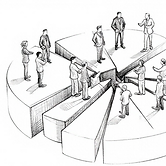
Drive campaigns through advanced segmentation
and personalization

Strengthen strategic decision-making through data-driven insights
My Role
As a Senior UX/UI Designer I lead the strategy in the UX experience and User interface. I worked closely with product managers, accessibility specialists, stakeholders, and other designers to bring clarity and usability to the new product list experience.
Ux Research Plan
Empathize Stage
I define clear objectives, identify key participants, and shape a timeline that would lead to meaningful, actionable insights
What obstacles do users face when creating product lists?
What does an ideal experience look like to them?
How confident do they feel at each step of the process?

Metodology
I applied the User Center Design—an approach that allowed me to deeply connect with users and uncover meaningful opportunities.
Interviews
I conducted 7 structured interviews. This qualitative approach allowed me to uncover the root causes behind their frustrations, behaviors, and beliefs around managing product lists.

Michael

Emily

James

Madison

William

Ethan
Interview Questions
I define a set of structured questions that would allow me to capture actionable insights from the very first interaction. These questions helped guide each session while still allowing space for users to expand and share their unique experiences.

"Every time I have to put together a product list for an order, I end up duplicating SKUs or making mistakes that I later have to fix manually"
" I don’t have clear insights into how the product has performed over time or within the lists that have been used. "
Interview Insights
" I want to create product lists for campaigns by region or segment, but I have to build everything from scratch and rely on Excel "
" In order to measure how effective the lists were in terms of sales or profitability, I have to merge information from many platforms "
" There are too many people creating lists on their own without alignment. I can’t see who did what or when, and that leads to duplicated efforts "
" I don’t have clear insights into how the product has performed over time or within the lists that have been used "


Surveys
I run surveys with 7 participants to broaden our understanding and move beyond anecdotal feedback and bring in measurable insights that directly influenced our design decisions.
Survey Template
I crafted questions around four key areas:
-
General Workflow
-
List Structure
-
Priorities
-
Pain Points
-
Tools & Automation

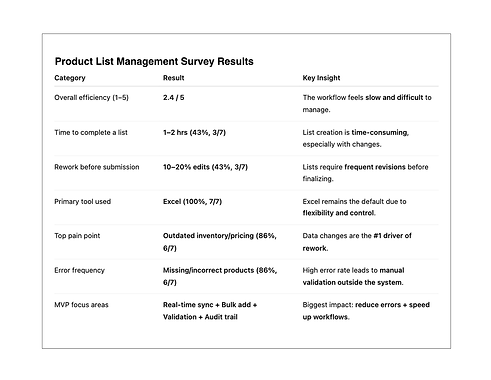
Survey Results
Key insights from the survey areas:
-
Excel-based workflows
-
Time-consuming list creation
-
Frequent revisions & rework
-
Inventory & pricing inconsistencies
-
Missing or incorrect items

Competitive Analysis
I carried out a competitive analysis to understand how other platforms approach product lists
Competitive Analysis Results
I used template for my analysis. It served as a strategic tool to validate our direction and highlight where we could stand out

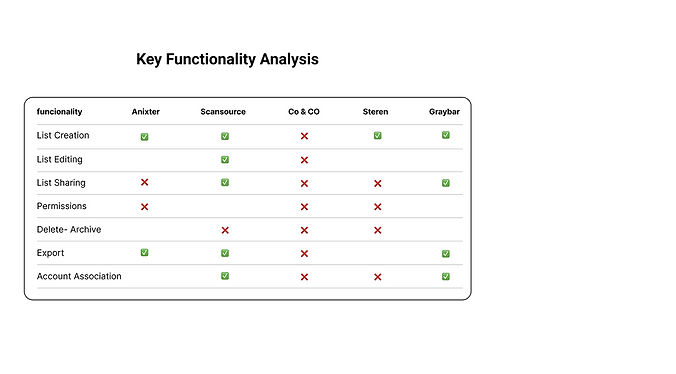
Competitive Key Funcionality Analysis
This analysis allows me to identify key opportunities to improve the user experience.

User Persona
Define Stage
To represent my findings, I create a user persona:
Alex, a purchasing manager with experience in technology, whose main responsibility is managing product orders and maintaining an adequate inventory.

Persona
Template of the user persona with all the details.
User Journey
I map a User Journey, detailing each step that users follow in their current workflow. I identifies moments of friction and what Alex thinks and feels during his experience.

Ideation (Stage)
With a clear understanding of Alex paint points and needs, I start to design in collaboration with the design team and developers.

Sketching (Stage)
With a clear direction set, we move into the sketching phase. Using Figma and FigJam, the team collaborates closely to explore early design ideas, wireframes, and user flows.
Prototyping
We move from sketches to interactive prototypes. At this stage, we begin testing core interactions and flows


Iterations
I went through several iterations in the design, based on internal reviews and preliminary testing sessions.

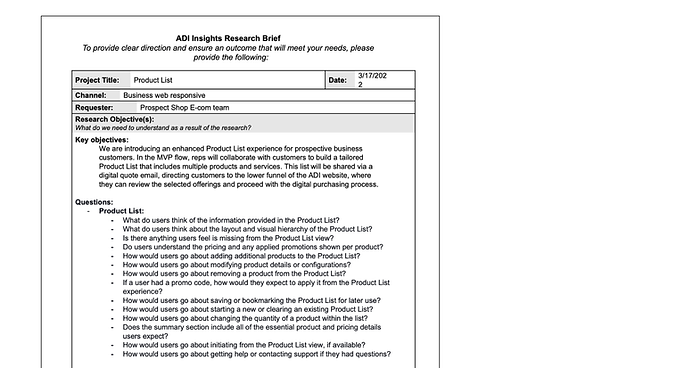
User Testing Document
I defined the scope of the user testing
User Testing Questions
In user testing with eight participants, I find that 35% of tasks were completed successfully, but 72% of users had difficulties.

Testing Feedback
Different stakeholders shared their feedback, revealing usability issues and overlooked needs that could affect adoption.

"the total update was slow when changing an item's quantity"

"The Edit menu concealed the remaining options"

"Predictive search showed irrelevance results"

"Notifications for privacy setting changes"
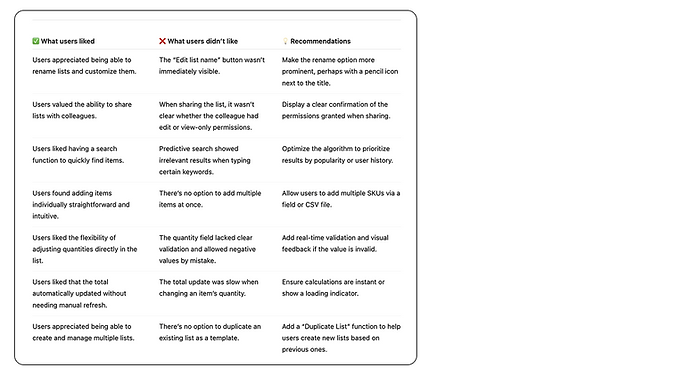
Testing Results
Their feedback uncovers moments of confusion and friction—such as unclear permissions, irrelevant search results, and slow updates. As a result I get a big and clear picture of everything that needs to improve.
Iterations
These insights guided the next iteration of design.
Final Mockup
This final mockup represents the consolidated design solution, integrating validated feedback, refined interactions, and visual consistency to support a clear, usable, and scalable experience.


Key Results
With the launch of the new Product List, sales, marketing, and product teams began seeing real, measurable impact in record time.

Sale and product teams can now connect product list to sales data

Historical product list usage now informs procurement planning

Marketing teams now segment product list by category, and customer type directly within the tool

Inventory visibility and realtime editing make it easier to detect low rotation

Centralized list management and validation features prevent costly errors

3x faster identification
of items for promotions
or clearance
Next Steps
Looking ahead. The focus now shifts to refining the tool based on real user and stakeholder feedback collected during this rollout.
At the same time, Track and address any design debt introduced during new revisions—ensuring future iterations are smoother, smarter, and even more aligned with business goals.
